Zhanga Redux
The chronicles of the work and personal life of a boring software developer with an awesome dog.
No-name AliExpress/Alibaba “P8” 8-inch mini-laptop
Friday, September 13, 2024
While doom-scrolling through Facebook one day, I came across a curious Amazon ad for an 8” mini-laptop. I was immediately intrigued since I had never seen anything like it, and I really liked the form factor (same size as iPad Mini, but thicker) as it would be much easier to fit into a bag or even large pocket than even a small 13” laptop.
Of course, rather than buying it from Amazon, I went straight to the source: Alibaba. Here’s the listing I bought mine from, though there are multiple shops on Alibaba and AliExpress selling basically the same thing. The “brand” (if it can be called that) that I see mentioned most in listings is “KOOSMILE,” but the physical device I received has no brand markings on it. Total time from payment to laptop-in-hand was 11 days, much faster than I expected.
Photos
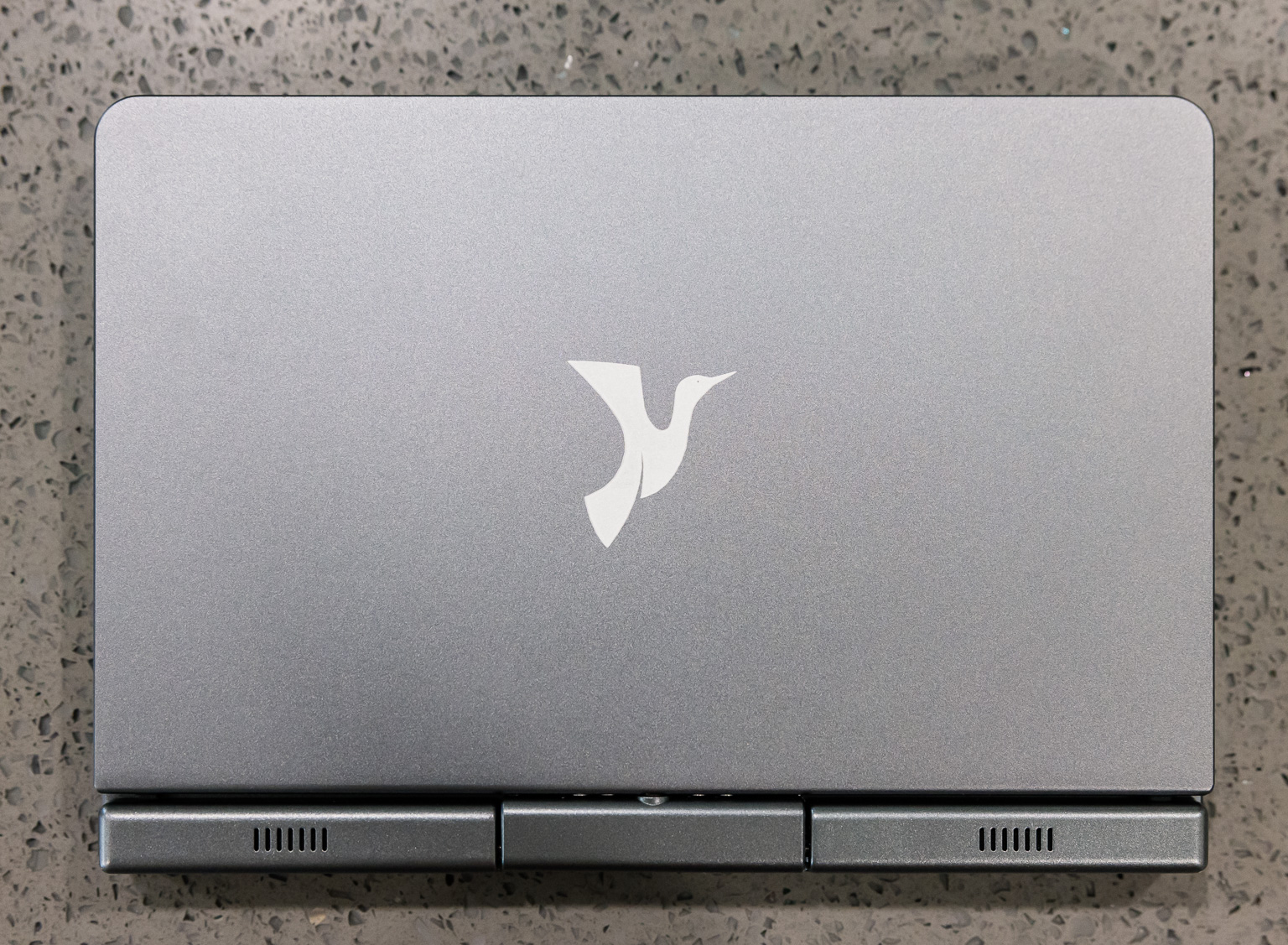
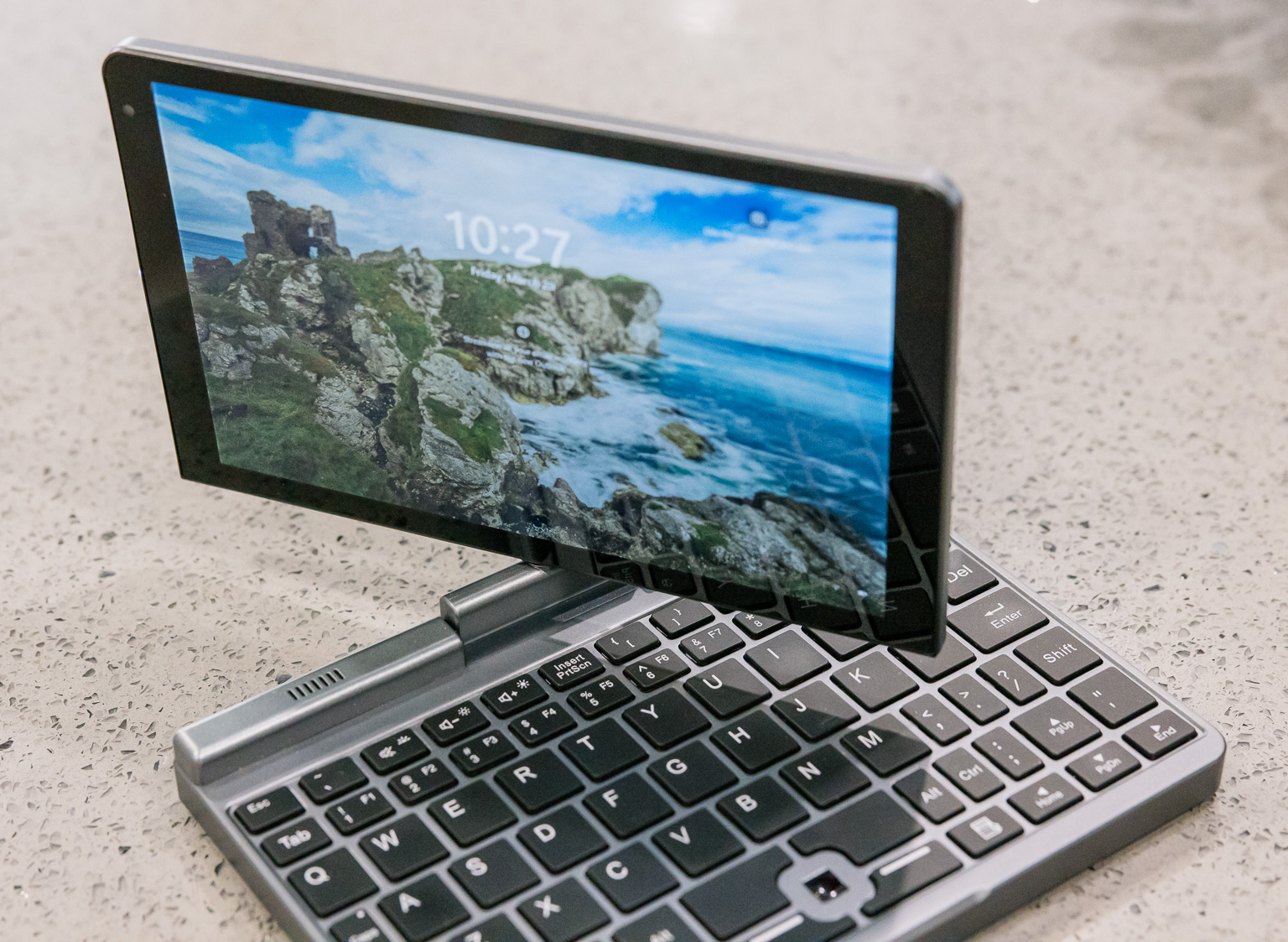
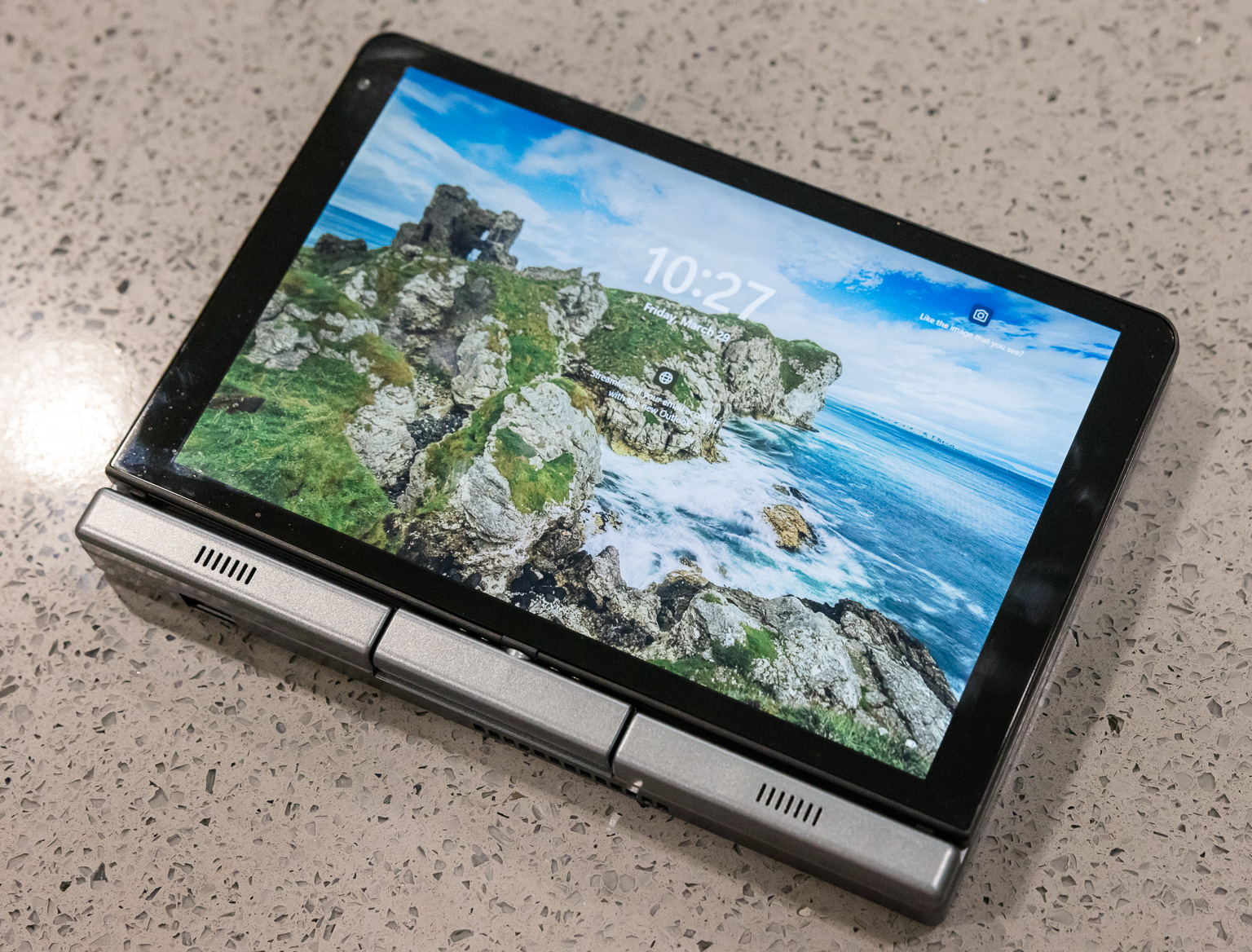
Specifications
The machine as I configured it is equipped with:
- CPU: Intel N100 (4 cores/4 threads, max 3.40 GHz, 6W TDP)
- RAM: 12 GB DDR5 4800 MHz
- SSD: 1 TB M.2 SATA
- Display: 8” 1280x800
- Battery: 11.4V Lipo, 3200mAh (36.48 Whr)
- Camera: front-facing 2.0 MP
- Connectivity: 1 gigabit RJ-45, WiFi 6, Bluetooth (all Realtek)
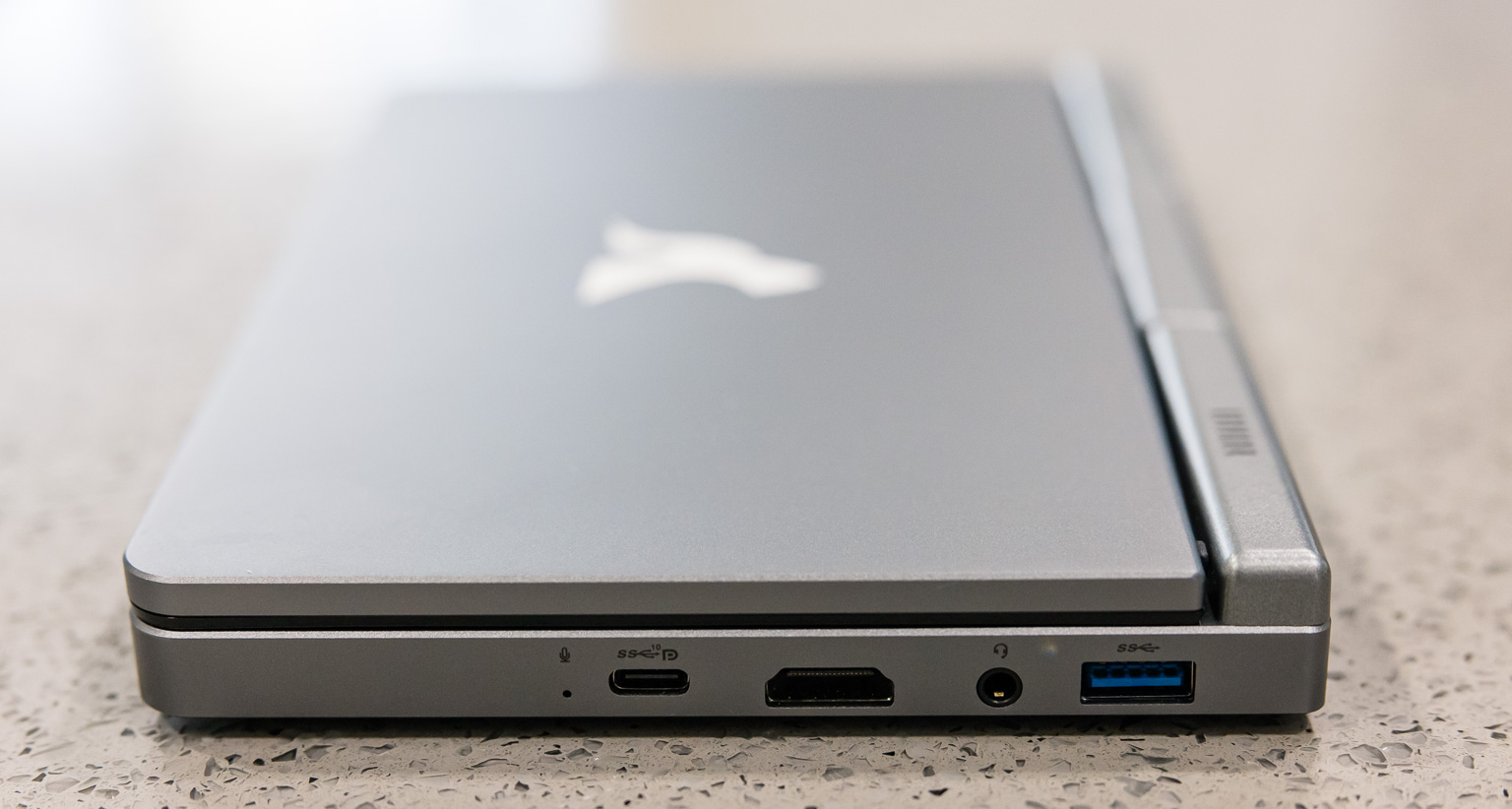
- Ports: (one each) USB 3.2 C, USB 3.0 A, HDMI, 3.5mm audio
- Other: backlit keyboard, active stylus
Let’s dig into various parts of this laptop in more detail.
CPU
This machine comes with the Intel N100 CPU, which has become quite popular in the mini-PC market. I actually have another N100 (not a laptop) that I run security camera software on 24/7, and it’s a great choice for that task due to its low initial cost and low ongoing power consumption.
The chip is decently-performing. It provides similar performance to the Intel i5-7500 but has an 11x lower TDP rating. It runs Windows 11 just fine.
SSD
The SSD that most sellers (including the one I chose) seem to provide is SATA. In hindsight, I should have gone with an NVMe drive instead, as the overall system performance does sometimes get quite bottlenecked by the SATA bus. The drive that came with the system is physically able to sustain 500 MB/s reads and writes, at least for short periods of time. (I didn’t try to exhaust the SLC cache, if there is one.)
Display
The display is one of the most interesting parts of this laptop, primarily since it’s size-constrained to the mini-laptop form factor. The display is almost exactly 8” across the diagonal. The 1280x800 pixel count sounds lacking, but since the screen is physically so small, it works out to about 185ppi — the same pixel density on a 27” screen would be 4320x2700. As a result, it looks quite sharp.
The brightness is reasonable, and at this price point, quite good. Compared to my Macbook, its brightness range is narrower: its dimmest setting is not as dim as the Macbook’s, and its brightest setting not quite as bright. But it’s still totally usable, and it is (barely) readable under sunlight.
Out of the box, the colors are extremely cool (blue), however this is easily corrected with a color calibrator. Once the screen is calibrated, it’s accurate enough to no longer bother my very picky eyes. However, I wouldn’t do color-sensitive work (e.g. editing photos) on it. Not that I ever intended to do this anyway on an 8” screen.
The touch screen is responsive and accurate, as you’d expect any modern capacitive touch screen to be. The active stylus works very well, and the pressure sensitivity also works as expected.
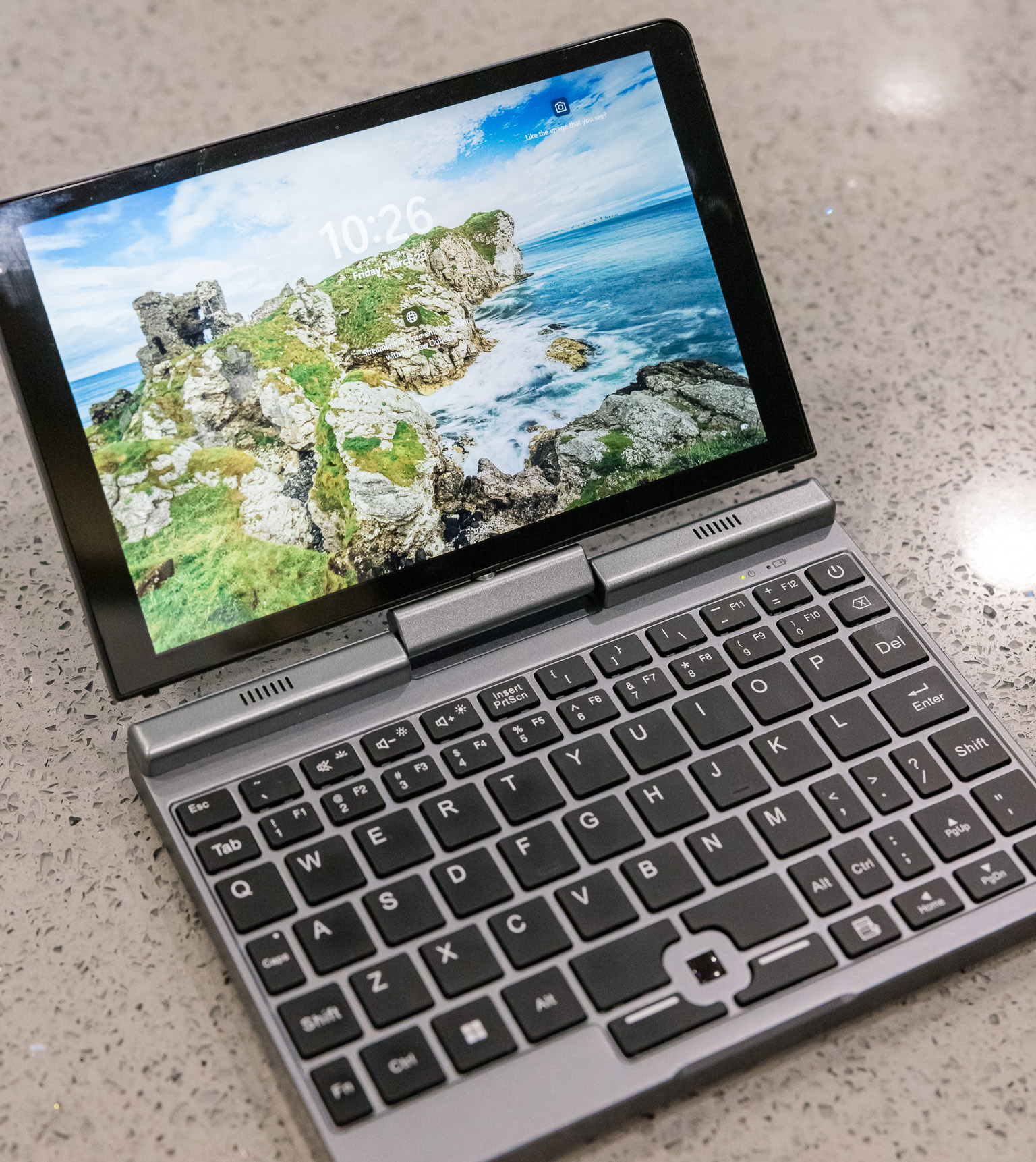
The display can be rotated 180 degrees and folded back down over the keyboard to switch the laptop into a tablet configuration. In Windows, this causes the orientation sensor to automatically activate so that the display can be used in any of the four orientations.
Battery & power
The built-in battery has 36.48 Whr capacity. I’m impressed they managed to fit that into a machine this small; for comparison the original 13” M1 Macbook Air has a 49.9 Whr battery. That’s probably not the best comparison though, as this laptop is significantly more power-hungry than the ARM Macbooks; the power draw at idle is about 5W, and this can exceed 15W and even reach 25W+ under high load. At moderate usage it’ll use up around 7-9W and should be good for a solid 4 hours. I find this to be a pretty convenient runtime, as that covers most of a day of sporadic usage (it’s not like I can really work on this tiny machine for a full day straight anyway), and for anything longer I can bring a power adapter or battery bank.
The only way to feed this laptop power is via the USB-C port on the right-hand side. While the Alibaba listing says 20V*1.5A or 15V*2A, I’ve only ever seen it draw 20V from a wide variety of power sources that I’ve tried. Out of the box, it accepted power from the included AC adapter as well as two Macbook USB-C AC adapters I have. However, it would not accept power from any of my USB-C PD power banks. After fiddling with a bunch of BIOS settings, it then started accepting my power banks (at 20V)… unfortunately though, I don’t know which setting did the trick because I changed so many settings that I lost track, and when I tried changing back all the settings, USB-C charging still worked…
I did find someone who had a similar problem in this Reddit thread, but luckily, the PD trigger hack turned out to be unnecessary in my case. (Note: the Nanote P8 is not the same as this P8 laptop.)
Camera
The camera is located on the upper-left side of the display bezel. It is functional, as in, I can recognize my face when I turn it on. The quality leaves much to be desired.
Connectivity
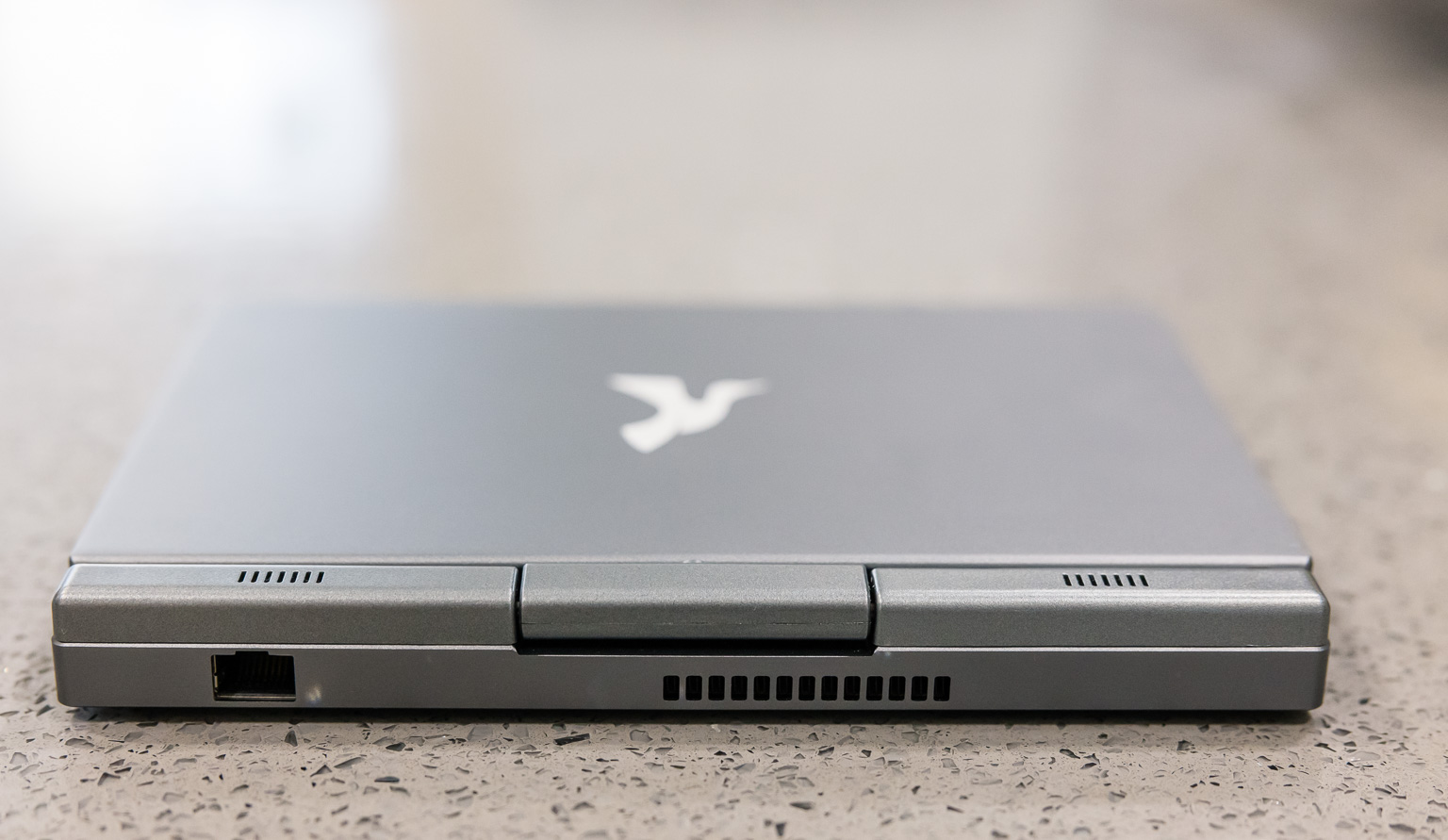
I was surprised by the inclusion of an Ethernet jack on the back of this machine, so that was a nice touch. It turned out to be quite important, though: this port works out of the box on Windows 11, but the wifi adapter does not, and installing Windows is quite painful without any network connectivity. (Amusingly, both interfaces work out of the box on Linux under Fedora 39.) Once the driver is installed, wifi works great.
Bluetooth also needed a manual driver installation (on Windows). My Bluetooth devices seem to randomly disconnect every once in a while though, and I have to toggle Bluetooth to get them working again. I’m not sure if it’s some kind of user error, faulty hardware, wrong driver, or something else.
Ports
Aside from the Ethernet port, there are several other ports along the side of the laptop:
- USB 3.2 type-C
- This is a fully-featured USB-C port, which I was a little surprised by given the price point of this laptop. It provides power to the laptop, can drive a display, and can act as just a USB port. I have a cheap 4K USB-C display that works great with this port: the display itself takes wall power, then the USB-C cable that runs between the display and the laptop both sends power to the laptop and also feeds video to the display. One complaint: I wish this port was physically located either at the back of the laptop or on the side towards the back. It’s on the right side in the center, which gets in the way of actual usage since there’s almost always something (e.g. power) plugged in here.
- HDMI
- Full-size HDMI out. Again, a little surprised that this laptop provides a full-sized (rather than mini-HDMI or micro-HDMI), so this was a nice surprise. The machine has no trouble at all driving a 4K display.
- USB 3.0 type-A, 3.5mm jack
- Just your ordinary USB-A and audio ports.
- I’d rather run Linux than Windows, but as mentioned above, Linux doesn’t currently support the display. I wish it did.
- The placement of the USB-C port at the center of the right edge is awkward. Since it is the power port, it should have been placed further back, where every other laptop in existence puts the power port.
- I should have gotten an NVMe SSD instead of SATA. Of course, this would also have cost me more money.
- As discussed above, Bluetooth drops out randomly, but this may or may not be the laptop’s fault.
- The touchpad should be made a more reasonable size.
- There is nowhere to put the stylus. It’s a very useful and convenient pointing device (especially since the touchpad is so tiny), but I’m always afraid of losing it. It would be nice if there were a clip or slot or something for the stylus.
Build quality
The outer shell is all metal except for the small speakers near the display hinge. (By the way, the speakers’ audio quality is bad.) The display hinge feels physically smooth and solid, though because of the small size of the rotating part, it still makes me feel a little uneasy. The display holds itself shut in both orientations (display facing inward like a laptop or outward like a tablet) magnetically. There is no wiggle or play in any component. It all feels like a premium product, not a cheap $300 toy.
Keyboard/touchpad
Some listings advertise the keyboard as “full-sized.” Sure, the A-Z keys might be full-sized, but nothing else is, and many keys are in weird places, e.g. Tab is above Q instead of to its left, and :; is below >. instead of above it, so don’t even think about using Dvorak. However, I can’t really blame them, as obviously a real full-sized keyboard won’t fit, so something has to give. And layout aside, the keyboard physically works well.
The touchpad for moving the mouse around is comically tiny. It works and has excellent sensitivity/accuracy, but it’s about 1/4”x1/4” which is literally ~200x smaller than a Macbook touchpad.
Linux
I tried unsuccessfully to install Fedora 39 on this laptop. It almost works. As noted above, it actually works better than Windows in some ways, for example, wifi works by default. However, while Linux will happily drive an external display, I couldn’t get the built-in display to work. After the initial text-only phase of the boot process, the display turns black and nothing can be shown. Others have this problem too (see bug report) and reported that sleep + resume makes the display work, which I found does the trick in my case as well. However, I noticed that sleeping and resuming a second time makes the display not work again, so this is quite unsuitable for actual use.
Final thoughts
I really like this laptop. As much as I love my iPhone, it’s really nice to be able to do work on a fully-featured OS where I can open multiple windows, work with a real filesystem, etc. The tiny form factor of the laptop means I can easily bring it almost anywhere, so it’s more than just a fun toy to me. Including shipping, Alibaba fees, and sales tax, I paid about $370. The functionality and quality are far better than I was expecting for that price.
There are a few things I wish were better about this laptop:
Overall, these are pretty minor complaints. In the future, I’d be willing to pay a lot more money for a thinner, more powerful mini-laptop. But for now, I paid for and expected a toy, and instead, I got a solidly-built and useful machine.
Deleting built-in apps from Windows 10
Sunday, March 17, 2024
Ever tried to delete the built-in/preinstalled Windows 10 apps but they won’t go away?
C:\Windows\System32> Get-AppxPackage *Zune* -AllUsers | Remove-AppxPackage -AllUsers
Remove-AppxPackage : Removal failed. Please contact your software vendor.
Deployment Remove operation with target volume C: on Package Microsoft.ZuneMusic_10.20122.11121.0_x64__8wekyb3d8bbwe
from:   failed with error 0x80070002. See http://go.microsoft.com/fwlink/?LinkId=235160 for help diagnosing app
deployment issues.
At line:1 char:35
+ Get-AppxPackage *Zune* -AllUsers |Remove-AppxPackage -AllUsers
+                                   ~~~~~~~~~~~~~~~~~~~~~~~~~~~~
    + CategoryInfo          : NotSpecified: (:) [Remove-AppxPackage], COMException
    + FullyQualifiedErrorId : System.Runtime.InteropServices.COMException,Microsoft.Windows.Appx.PackageManager.Comman
   ds.RemoveAppxPackageCommand
The solution is here. Use -PackageTypeFilter:
C:\Windows\System32> Get-AppxPackage *Zune* -PackageTypeFilter Main, Bundle, Resource -AllUsers | Remove-AppxPackage -AllUsers
There, gone! You can check C:\Program Files\WindowsApps and see that the directory has been deleted.
Installing Ruby 2.7 + Passenger with Apache on Centos 7
Wednesday, April 5, 2023
CentOS 7 comes with Ruby 2.0, which was released in 2013 and has been deprecated since 2016. (Even CentOS/AlmaLinux 8’s core repos only have Ruby 2.5, which is also outdated, but at least they have dnf streams which make changing the version much easier.) Here is a quick guide to installing Ruby 2.7 on CentOS 7 and getting it working with Apache + Passenger.
First, install/enable the SCL, whose repo definition is provided by the default extras repo, then install Ruby from it:
# yum install centos-release-scl
# yum install rh-ruby27
At this point, Ruby 2.7 is installed, and if you want to run it locally (e.g. to run bundle etc), you can do so by enabling the SCL and spawning a shell:
$ scl enable rh-ruby27 bash # or other preferred shell
$ bundle install ... # or whatever other Ruby commands
Next, install Passenger by following the official guide. If you already have EPEL enabled, then it is likely you only need to install the Passenger repo and then install the Apache module:
# curl --fail -sSLo /etc/yum.repos.d/passenger.repo \
    https://oss-binaries.phusionpassenger.com/yum/definitions/el-passenger.repo
# yum install mod_passenger
At this point you will have two versions of Ruby installed, and Passenger will be using the wrong one (v2.0) by default. To get it to point to Ruby 2.7, edit /etc/sysconfig/httpd and add this line so that Apache knows about the right library path:
LD_LIBRARY_PATH=/opt/rh/rh-ruby27/root/usr/local/lib64:/opt/rh/rh-ruby27/root/usr/lib64
Then edit /etc/httpd/conf.d/passenger.conf so that it can see this environment variable + points to the right Ruby binary:
PassengerRuby /opt/rh/rh-ruby27/root/usr/bin/ruby
PassEnv LD_LIBRARY_PATH
Restart Apache, and that’s all!
Backblaze B2 Data Corruption Bug
Friday, February 26, 2021
Over many years of faithfully trusting my offsite backups (almost 10 TB) to Backblaze B2, questioning its data integrity never really crossed my mind. It was simply inconceivable that such a widely-used data storage service could possibly return corrupted data. After all, correctly storing and returning data is basically the entire premise of B2, and yet, here we are…
This is the story of how, for an unknown (to me) amount of time, Backblaze B2 returned corrupted data for a small fraction of my files, preventing a successful restore. Luckily, I did not find out this hard fact during disaster recovery.
TL;DR: Backblaze B2 had a data corruption bug that would cause it to return corrupted data for an unknown amount of time, but at least 23 days according to publicly known reports.
Duplicacy
I use Duplicacy to back up my data to Backblaze B2. Duplicacy is an officially recommend B2 client; see the B2 Integrations page. A quick summary of the relevant bits: Duplicacy performs incremental, deduplicated, and encrypted backups by producing chunks from the original files and storing those chunks into B2. Chunks are represented in B2 as files of around 1-10MB each.
In the past, I had periodically run duplicacy check -a to verify that every chunk exists, but this does not verify their contents. Downloading data from B2 is relatively costly ($100 for the 10 TB), and I figured that if my data made it to B2, it was probably fine…
A few days ago, I decided it was time to perform a full verification of my backup data just to be safe. After downloading a whole lot of data and verifying their bits (and racking up a B2 bill in the process), Duplicacy reported a bunch of failures like this:
$ duplicacy check -r 265 -chunks -threads 32 -persist
...
Failed to decrypt the chunk aec070645fe53ee3b3763059376134f058cc337247c978add178b6ccdfb0019f: cipher: message authentication failed; retrying
Failed to decrypt the chunk aec070645fe53ee3b3763059376134f058cc337247c978add178b6ccdfb0019f: cipher: message authentication failed
...
42 out of 1405935 chunks are corrupted
Duplicacy writes a MAC into each chunk, and the error message tells us that the MAC doesn’t match the chunk’s contents. Somewhere along the pipeline, some bits have changed.
I then noticed a very odd behavior: if I attempted to verify just those 42 corrupted chunks, a few more would successfully verify, and if I ran it again a few more would verify, and so on, until after about 20 tries, 38 of the 42 corrupt chunks eventually returned as verified. Duplicacy tries each chunk 4 times before giving up, so 4 chunks in my backup set still had yet to be successfully verified even after trying to download them 80 times.
I made a post on the Duplicacy forum as I was certain I must have been doing something wrong, or perhaps Duplicacy was buggy. Gilbert, the developer (who is very helpful, by the way), suggested it might be memory corruption and asked that I try again without -threads 32 and to try a different machine. I did so… with the same results.
Backblaze B2
Here’s where it gets interesting with respect to B2. Before proceeding, here’s a little background on Duplicacy and B2:
- B2’s
b2_upload_fileAPI accepts a client-computed SHA1 hash of the file, and it will reject uploads received with a mismatched hash. This should prevent corrupted data from being written to B2 in the first place, unless of course the corruption happens before the client computes the SHA1. - Duplicacy always provides this SHA1 on uploads.
- Upon download, aside from the file contents, B2 also returns the SHA1 that was originally supplied.
- The official B2 CLI tool checks the hash after download and throws an error if verification fails
- Duplicacy does not check the B2 hash on download, but instead checks its own MAC inside the file, which in this case serves the same function: rejection of corrupted downloads.
I took the list of 38 corrupted-but-later-verified chunks and used the B2 CLI to try to download each chunk one by one. Most of them failed to download and the CLI tool reported sha1 checksum mismatch — which should never happen, as this indicates data corruption somewhere between B2’s successful acceptance of the upload and the post-download hash verification on the client — but 3/38 downloaded successfully.
Even more alarmingly, I even managed to find a chunk that flip-flopped between sha1 checksum mismatch and successful download within seconds of each other:
[user@host duplicacy]$ b2 download-file-by-name [bucket-name] chunks/b5bb9d8014a0f9b1d61e21e796d78dccdf1352f23cd32812f4850b878ae4944c 1
1: 100%|███████████████████████████████████| 3.27M/3.27M [00:00<00:00, 44.9MB/s]
ConsoleTool command error
Traceback (most recent call last):
  File "b2/console_tool.py", line 1521, in run_command
  File "b2/console_tool.py", line 690, in run
  File "logfury/v0_1/trace_call.py", line 84, in wrapper
  File "b2sdk/bucket.py", line 170, in download_file_by_name
  File "logfury/v0_1/trace_call.py", line 84, in wrapper
  File "b2sdk/transfer/inbound/download_manager.py", line 122, in download_file_from_url
  File "b2sdk/transfer/inbound/download_manager.py", line 134, in _validate_download
b2sdk.exception.ChecksumMismatch: sha1 checksum mismatch -- bad data
ERROR: sha1 checksum mismatch -- bad data
[user@host duplicacy]$ b2 download-file-by-name [bucket-name] chunks/b5bb9d8014a0f9b1d61e21e796d78dccdf1352f23cd32812f4850b878ae4944c 2
2: 100%|███████████████████████████████████| 3.27M/3.27M [00:00<00:00, 49.9MB/s]
ConsoleTool command error
Traceback (most recent call last):
  File "b2/console_tool.py", line 1521, in run_command
  File "b2/console_tool.py", line 690, in run
  File "logfury/v0_1/trace_call.py", line 84, in wrapper
  File "b2sdk/bucket.py", line 170, in download_file_by_name
  File "logfury/v0_1/trace_call.py", line 84, in wrapper
  File "b2sdk/transfer/inbound/download_manager.py", line 122, in download_file_from_url
  File "b2sdk/transfer/inbound/download_manager.py", line 134, in _validate_download
b2sdk.exception.ChecksumMismatch: sha1 checksum mismatch -- bad data
ERROR: sha1 checksum mismatch -- bad data
[user@host duplicacy]$ b2 download-file-by-name [bucket-name] chunks/b5bb9d8014a0f9b1d61e21e796d78dccdf1352f23cd32812f4850b878ae4944c 3
3: 100%|███████████████████████████████████| 3.27M/3.27M [00:00<00:00, 47.1MB/s]
File name:    chunks/b5bb9d8014a0f9b1d61e21e796d78dccdf1352f23cd32812f4850b878ae4944c
File id:      [file-id]
File size:    3267110
Content type: application/octet-stream
Content sha1: f1d2d2f924e986ac86fdf7b36c94bcdf32beec15
checksum matches
A few other interesting characteristics of these broken files were:
- For affected chunks, a successful download did not imply further successful downloads. In other words, downloading the same chunk repeatedly may succeed once but then fail repeatedly after that.
- Failures seemed correlated in time; trying to download failed chunks repeatedly in a loop did not seem to help (I tried 4 arbitrarily-chosen chunks 100 times each and got 400 SHA1 mismatches), but waiting hours or days seemed to improve the likelihood of possibly getting a successful download.
Just to make sure it’s not something having to do with my local setup, I tried the B2 CLI client on not just my regular backup machine (one with ECC RAM and RAID 6), but also two other physical machines, including one with a different OS and another tethered to my cell data connection instead of using a my landline Internet, but all with the same results.
At this point, it seemed like a bug on Backblaze’s end must be the only explanation, so I submitted a support ticket.
Backblaze’s Response
Backblaze confirmed to me that this issue was affecting multiple customers. Gilbert (the Duplicacy developer) pointed me to issue #3268 on Restic (another backup client, similar to Duplicacy) where users encountered the same data corruption, and some more detail is provided in that thread.
Essentially what is happening is that files in B2 are sharded into 20 pieces, any 17 of which can be used to reconstruct the file, i.e. up to 3 shards can fail before data loss occurs. Backblaze did not verify checksums on reading for download, but rather via an async job that would scan for corruption, and a bad batch of hard drives caused this job to run more slowly than usual, lengthening the amount of time corrupted data was being served up.
The good news is that it seems very unlikely any data was permanently lost; however it’s quite surprising to me that Backblaze has gone so many years without verifying reads and thus knowingly returning corrupted data on a small percentage of downloads.
On March 1, 2021, a fix was applied which added checksum verification on download. All of my files seem to be readable now, so hopefully this particular issue is fixed for everyone.
Windows fails to format USB drive that previously contained an ISO image
Thursday, February 11, 2021
I recently tried to format a USB flash drive for use in Windows, only to find that none of the usual tools (Explorer, Disk Management) would work. Even repartitioning the drive in Linux using fdisk didn't help.
Symptoms include:
Explorer doesn't show a drive letter when the drive is inserted, even if formatted FAT or NTFS.
Attempting to create a partition using Disk Management (New Simple Volume) may fail with:
The operation is not supported on a non-empty removable disk.
Or it may succeed, but the associated format step may fail and a dialog will pop up:
The volume was created successfully but it was not formatted. Retry the format using the format task.
Attempting to format the partition using Disk Management produces this error dialog:
The system cannot find the file specified.
diskpart's CLEAN fails with an error similar to:
DiskPart has encountered an error: The system cannot find the file specified. See the System Event Log for more information.
The log in Event Viewer/Windows Logs/System has Source "VDS Basic Provider" and message:
Cannot zero sectors on disk \\?\PhysicalDrive2. Error code: 5@0101000F
(All messages above taken from Windows 10.)
To fix this, plug in the drive and run diskpart. Select the appropriate disk:
LIST DISK
SELECT DISK #
Then try CONVERT:
CONVERT MBR
If that doesn't work, try CONVERT GPT or CLEAN. Good luck!

Archives
2024
- September (1)
- March (1)
2023
- April (1)
2021
- February (2)
2020
- March (1)
- January (1)
2018
- April (1)
- March (1)
2017
- February (1)
2015
- March (1)
2014
- June (1)
- May (1)
- March (1)
2013
- December (1)
- May (1)
- April (1)
- March (2)
2012
- December (1)
- September (1)
- August (3)
- July (1)
- February (1)
- January (1)
2011
- December (1)
- June (1)
- April (1)
- March (1)
- January (2)
2010
- December (1)
- November (4)
- October (1)
- June (2)
- May (1)
- March (1)
- February (2)
- January (2)
2009
- December (4)